

literature-table.md and meeting-outline.md.
If you have no material yet, download the practice pack and unzip it into its own folder. It contains three reading cards written from paper abstracts, each with its source, reading scope and the information not provided. For the exercise, only process the files starting with 01, 02 and 03.
If the material includes PDFs or other formats, first make sure the current Agent or App can read them. If reading fails, switch to a readable format or add the capability as prompted. Check every cited source in the result against the original.
Screenshots on this page show the Chinese interface.
1. Start from the folder with the material
In Projects, click + and choose Use an existing folder, then select the material folder. Open the project, click the folder, and choose the Agent, model and the device it actually runs on. Check the path on the card before sending. The current Beta may treat a subfolder inside a Git repository as the repository root. Keeping the practice pack outside any repository avoids this. If you already have a matching project, add the material folder to it. Different folders for the same research topic can live in one project.2. Make the literature table first
The prompt below refers to the files in the practice pack. With your own material, replace the first line.3. Write the outline after confirming
Based on the literature table just confirmed, write a group meeting outline to meeting-outline.md. Order: research question, evidence from each paper, common ground and disagreements, questions we can discuss. Keep the source for each item, and keep my ideas separate from the papers’ findings.Open the outline from the reply, next to the chat. You can ask it to “make part two shorter” or “mark the claims that still lack evidence”.
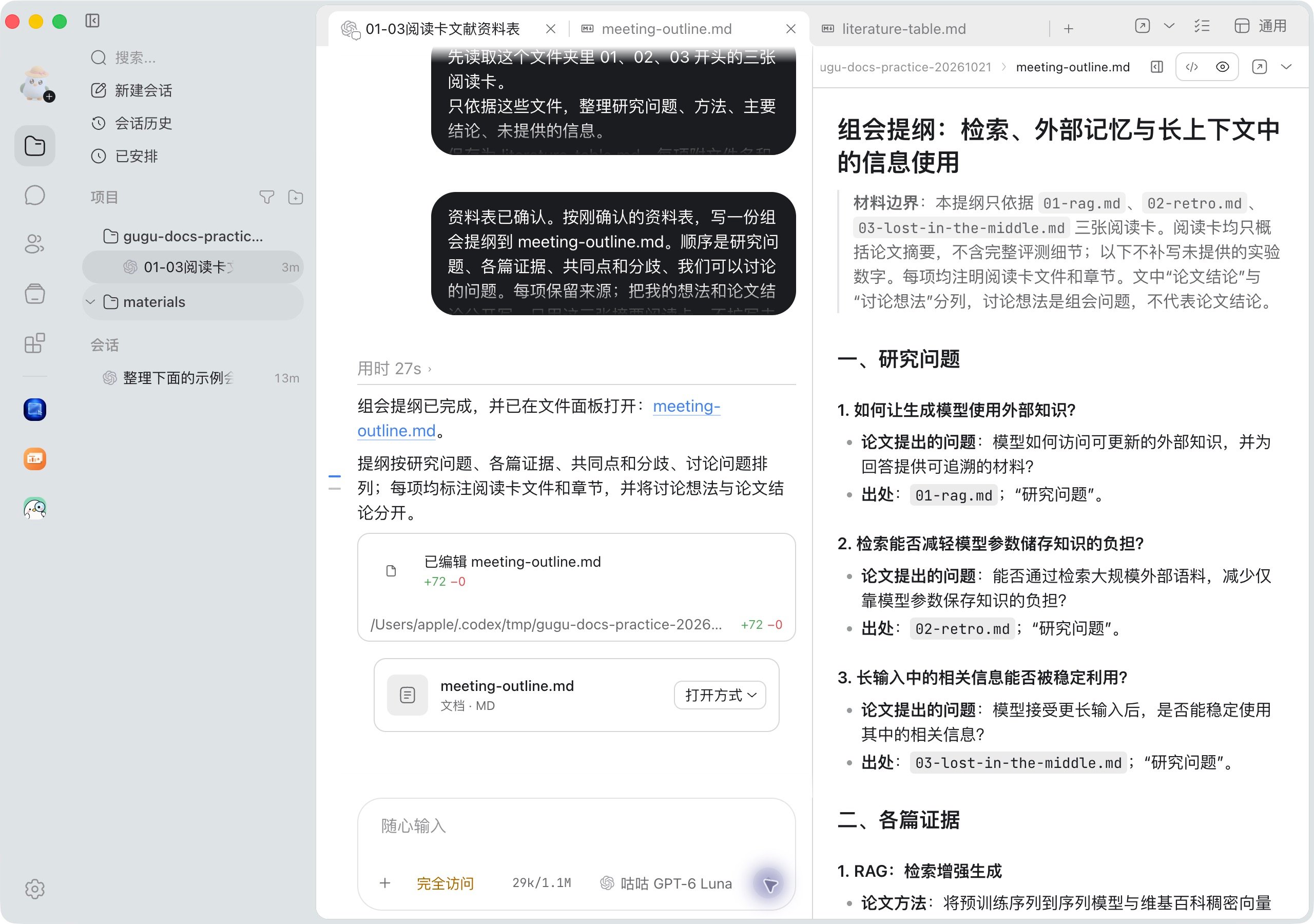
Actual result with the practice pack: the literature table is confirmed first, then the meeting outline is generated and opened in the same task.
4. Deliver to the people you work with
Add the people or existing Agents who will take over to the project group. Have the current Agent send the final literature table and outline to the group folder, then mention actual members and say who checks which part. The name below is an example of dividing the work.Put both finished files in the group folder. @Writing Assistant please check only the order of arguments in the outline, and reply with comments under the outline message.Checkpoints: the material opens, the original sources match, unknowns are still marked, and the person taking over knows what to check. Archive the task after it is done; archiving stops any Agent still running. To discuss a particular figure, open a topic from that message. For how to organize material across devices, see Projects and folders.